


Viva VPN
4.31.14K Reviews
App Specs
- Version
- 1.2.7
- Updated On
- License
- Free
- Downloads
- 10,000,000+
- Developer
- Viva team
- Categories
- Tools
- Platform
- Android
Screenshots
 Analysis by AppCompare
I reach for a VPN when I want an extra layer between my phone and a network I don’t control, or when I need to check how a website behaves from another region. Viva VPN is aimed at that everyday kind of use: it is a mobile tools app from Viva team, and its straightforward presentation makes the idea of connecting feel approachable rather than technical. My main advice is to treat it as a convenient privacy tool, not as a guarantee that every connection will be faster, anonymous, or able to open every blocked service.
What to expect from connection speed
A VPN adds a step to the route between your phone and a website, so speed can vary with the network, server choice, distance, and what you are doing online. That is true here too: I would not assume every connection will feel identical. A simple page or message may be perfectly comfortable, while a large download or high-quality stream is more likely to reveal a slowdown. If speed matters, compare the same task with the VPN on and off rather than judging it from a single brief connection.
That small comparison is useful before relying on any VPN for a time-sensitive task. I would open a familiar page, try the service I actually use, and see whether it remains responsive on the network I am currently using. If one available location feels sluggish, trying another is a reasonable troubleshooting step, but it is not a promise that a faster route will always be available. Viva VPN is best approached as a practical option to test against your own routine, rather than a speed upgrade.
Getting Started with Viva VPN
So, diving right into it, Viva VPN is pretty straightforward to install. Available on both Android and iOS, just head over to your app store and download the app. The installation process is a breeze, and before you know it, you’ll be setting up your account. The app doesn’t bombard you with a ton of initial setup screens, which is refreshing. You pretty much tap a few buttons and you’re good to go.
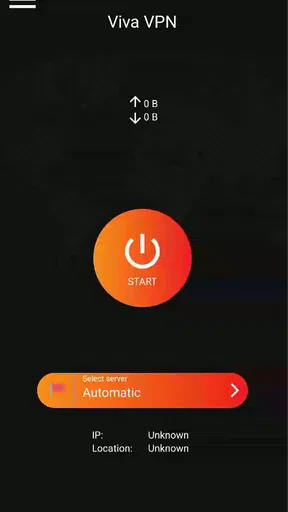
The interface is clean and user-friendly, which is always a plus in my book. I mean, who has time to fiddle around with a complicated app, right? The home screen gives you a big, inviting button to connect to the VPN, and bam, you’re surfing securely.
Using it when your phone is busy
VPN performance matters most when several things compete for the same connection. Picture me checking a work document over café Wi-Fi while a photo upload is running in the background. If the document loads slowly, I would pause the upload first, then check whether the VPN route or the busy network is the bottleneck. That is a more useful test than repeatedly disconnecting and reconnecting without changing anything.
For video calls, gaming, or other tasks where delay is noticeable, I would test the app before the important moment rather than switching it on for the first time mid-call. A VPN can add latency even when ordinary browsing seems fine. If a call becomes choppy, using a trusted network without the VPN may be the better choice for that particular session; privacy and responsiveness do not always point to the same setting.
Worth Reading Before You Choose

EA SPORTS FC Mobile 26 Is a Bigger Football Game, but It Takes Time

Flipboard Shows What News Apps Must Do Beyond the Feed

Switching to Android Auto Means Rethinking Your Driving Routine

Google Calendar Makes a Crowded Week Easier to Manage

Ludo King Makes the Most of the Minutes Between Plans

Baby Panda World Brings Quick Play to Modern Phones, but Its Game Library Feels Busy
Features You’ll Love
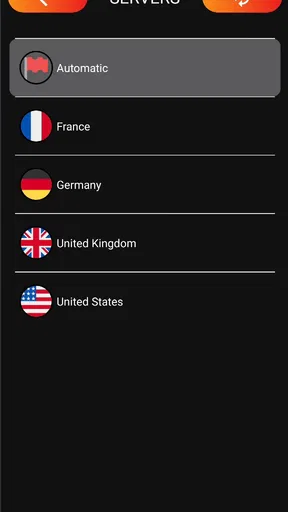
Alright, let’s talk features. One of the standout features of Viva VPN is its wide range of server locations. It’s perfect for those times you want to access content that’s not available in your region. Whether you’re trying to watch the latest series from across the pond or access a foreign website, Viva VPN has got you covered.
Another cool feature is the app’s focus on security and privacy. Viva VPN boasts military-grade encryption, which sounds intense, and it is. This means your data is super secure, making it harder for nosy third parties to snoop on your online activities. There's also a kill switch feature, which I find pretty essential. It cuts off your internet connection if the VPN drops, keeping your data safe from exposure.
Everyday reliability and recovery
What I care about after tapping connect is whether the tunnel stays usable while I move through an ordinary day. A phone may shift between Wi-Fi and mobile data, enter a weak-signal area, or briefly lose service. Those changes can interrupt VPN traffic, so I would not treat a single successful connection as proof that every handoff will be seamless. When something stops loading, first check the phone’s network itself, then reconnect and retry the affected app.
The kill switch described for Viva VPN is useful as a safety net if the VPN drops, but it also represents a trade-off: if the protected connection fails, internet access may be cut off until the VPN is restored. That can be reassuring for sensitive browsing and irritating when you simply need a map or a message to load. If the connection seems stuck, I would disconnect deliberately, confirm ordinary internet access, and then reconnect before assuming the phone or app is broken.
For a steadier routine, I would avoid changing server locations while an important upload or call is in progress. Finish the task first, then switch locations if you have a reason to do so. This is a modest habit, but it reduces the chance of interrupting a session and makes it easier to tell whether a problem comes from the VPN route or the underlying connection.
Performance and Usability
In terms of performance, Viva VPN doesn’t disappoint. The connection speed is pretty solid, which is crucial because nobody wants to sit there watching a spinning wheel while trying to stream a video. I’ve tested it on various servers, and while some are faster than others, overall, it provides a smooth experience.
The app doesn’t drain your battery as much as some other VPNs do, which is a relief. You can keep it running in the background without worrying too much about your phone dying halfway through the day.
Phone resources and device fit
A VPN runs while you use other apps, so some battery and network activity are part of the deal. I would pay attention to battery use during a normal day rather than infer it from a short test, especially if the phone is already old, running low on charge, or using a weak mobile signal. A VPN is unlikely to be the only thing affecting battery life, and heavy screen use, streaming, and poor reception can all matter more than the app itself.
Viva VPN is a tools app with an Everyone age rating, and its current version is 1.2.7. On Android, the minimum operating system is 6.0. Those basics make it accessible to a broad range of compatible phones, but compatibility alone does not guarantee equal performance: available memory, the age of the device, and the quality of its connection still shape the experience. If a phone is already struggling, I would test a short browsing session before leaving a VPN active all day.
One practical tip is to consider when you genuinely need the tunnel instead of keeping it on by habit. On an unfamiliar public network, extra protection may be worth the possible speed or battery trade-off. At home, for a low-risk task on a trusted network, you may prefer the direct connection if a particular app behaves poorly through a VPN. That choice is about matching the tool to the moment, not treating one setting as right for everything.
Choosing it over other VPN approaches
Compared with manually changing network settings or avoiding questionable Wi-Fi altogether, a dedicated VPN app is simpler to use: Viva VPN puts the connection action in a mobile interface rather than asking me to manage a route by hand. The trade-off is that a VPN does not make an unsafe website trustworthy, prevent every kind of tracking, or replace careful account security. I still use unique passwords and avoid entering sensitive details on pages I do not trust.
It is also worth separating a VPN’s privacy role from the promise of accessing region-restricted media. A different location can help with some regional checks, but streaming services and websites may block VPN traffic or apply their own rules. I would not subscribe to a service, plan a trip around a particular catalogue, or assume a site will work solely because a VPN offers multiple locations. For someone whose main requirement is consistent access to a specific service, a VPN with clearly documented compatibility and support for that service may be a better fit.
The app has a free price, and its scale is substantial: it has over 10 million installs, an average rating of 4.4 from around 44,000 ratings, and about 1,100 written reviews. I see that as evidence that many people have tried it, not as a substitute for checking whether it suits my own network and priorities. Viva team is the developer, and the app was released on October 12, 2023. Those details give useful context, but I would still judge it by day-to-day connection behavior and how clearly its privacy practices meet my needs.
Who will get the most from it
I would suggest trying Viva VPN if you want a simple mobile starting point for protecting traffic on networks you do not fully trust, and you are willing to check performance on your own phone. It is especially suited to occasional browsing, reading, and routine app use where a small change in speed would not ruin the task. The prominent connection control also makes it less intimidating for someone who does not want to learn detailed network settings first.
I would hesitate to recommend it as the only answer for someone who needs verified privacy guarantees for sensitive work, a consistently low-latency connection for competitive gaming, or dependable access to one particular streaming library. In those cases, I would compare providers on transparent security documentation, independent assurances, and the exact service requirements rather than relying on a broad claim of protection. If your only goal is to make a slow connection faster, a VPN is generally the wrong tool to reach for.
Before making it part of your routine, I would also check what account setup asks of you and read the app’s privacy information in the store. That is a sensible step with any VPN because your traffic is routed through the VPN provider while connected. A VPN changes whom you rely on for part of your connection; it does not remove the need to understand that relationship.
Why You Should Consider Viva VPN
If you’re still on the fence, let me share a bit more about why Viva VPN might just be the app you’ve been looking for. One of the things I appreciated is its customer support. It’s not every day you find an app that offers responsive and helpful support, but Viva VPN does just that. Whether you have a question about billing or need technical assistance, they’ve got your back.
Plus, there’s a free trial available, letting you take it for a spin before you commit. It’s a great way to see if it fits your needs without any financial commitment. And if you decide it’s not for you, canceling is hassle-free.
My practical verdict
My recommendation is to judge this VPN with a short, repeatable trial: connect on your usual Wi-Fi, load the sites you actually use, and repeat the same check on mobile data if that is part of your routine. Note whether pages load reliably, whether a call or video feels delayed, and whether the phone’s battery seems affected over a normal stretch of use. This gives you a more meaningful answer than a quick speed impression or a single successful connection.
If it behaves well for your ordinary tasks, its accessible setup and familiar connect-first approach make it a reasonable tool to keep available. If the connection repeatedly interferes with work, entertainment, or essential apps, turn it off for those tasks and compare another VPN rather than forcing a poor fit. The right choice depends on the balance you want between privacy, convenience, speed, and trust.
Wrapping It Up
All in all, Viva VPN is a solid choice for anyone looking to enhance their online security and freedom. With its user-friendly interface, robust features, and reliable performance, it’s worth considering for your VPN needs. So, next time you find yourself needing a bit of extra privacy or want to explore content beyond your borders, give Viva VPN a try. You might just find it’s the tool you didn’t know you needed!
Pros
- Easy-to-use interface for quick connection.
- Offers a wide range of server locations.
- No-log policy ensures privacy protection.
- Fast connection speeds for streaming.
- Supports multiple devices simultaneously.
Cons
- Limited free version with fewer features.
- Occasional connection drops reported.
- Some servers may experience slow speeds.
- No dedicated IP option available.
- Customer support lacks live chat feature.
FAQs for Viva VPN
What platforms is Viva VPN available on?
Viva VPN is available for both Android and iOS devices, providing users with a seamless experience across different platforms. Whether you're using a smartphone or tablet, you can download Viva VPN from the Google Play Store or Apple App Store and enjoy secure browsing on the go.
Is Viva VPN free to use?
Viva VPN offers a free tier with limited features for users who want basic protection. However, for a more comprehensive experience, including faster speeds and access to more server locations, a premium subscription is available. This ensures that users can choose a plan that best fits their needs.
How secure is Viva VPN?
Viva VPN employs top-notch encryption protocols to ensure your data remains private and secure. It uses AES-256 encryption, which is considered military-grade, to protect your internet traffic. Additionally, it has a strict no-logs policy, meaning it does not track or store your browsing activities.
Can Viva VPN bypass geo-restrictions?
Yes, Viva VPN is designed to help users bypass geo-restrictions and access content that may be blocked in their region. By connecting to servers in different countries, users can enjoy streaming services, websites, and apps that would otherwise be inaccessible from their location.
What kind of customer support does Viva VPN offer?
Viva VPN provides 24/7 customer support to assist users with any issues they may encounter. Support is available through various channels, including live chat, email, and a comprehensive FAQ section on their website. This ensures that users can resolve problems quickly and continue enjoying the service.


